------| # | CIDR Block | First Address | Last Address | Addresses |
|---|
-| Input | Result |
|---|
Calculating Exact CIDR Blocks From an IP Range
The converter works in three directions, and each updates as you type. CIDR to Range takes a block like 203.0.113.0/26 and returns the first address, last address, and address count, plus the subnet and wildcard masks for IPv4. Range to CIDR takes any start and end address and returns the smallest set of CIDR blocks that covers exactly those addresses. Bulk List processes CIDR and range lines and exports CSV.
In Range to CIDR mode, check the Extra Addresses figure before using the output. When it reads 0, the block list covers your range and nothing else, address for address. Every block shows its own first and last address, so each row can be checked against the request. If you need the deeper anatomy of any single block, the IP subnet calculator breaks it down to the bit level.
One Covering Block or Exact Blocks
Take the range 192.168.1.20 to 192.168.1.90, which is 71 addresses. Two different CIDR answers exist for it. The smallest single block that contains the range is 192.168.1.0/25, but it holds 128 addresses, so 57 of them are outside what you asked for. The exact answer needs seven blocks:
| CIDR Block | First | Last | Addresses |
|---|---|---|---|
| 192.168.1.20/30 | 192.168.1.20 | 192.168.1.23 | 4 |
| 192.168.1.24/29 | 192.168.1.24 | 192.168.1.31 | 8 |
| 192.168.1.32/27 | 192.168.1.32 | 192.168.1.63 | 32 |
| 192.168.1.64/28 | 192.168.1.64 | 192.168.1.79 | 16 |
| 192.168.1.80/29 | 192.168.1.80 | 192.168.1.87 | 8 |
| 192.168.1.88/31 | 192.168.1.88 | 192.168.1.89 | 2 |
| 192.168.1.90/32 | 192.168.1.90 | 192.168.1.90 | 1 |
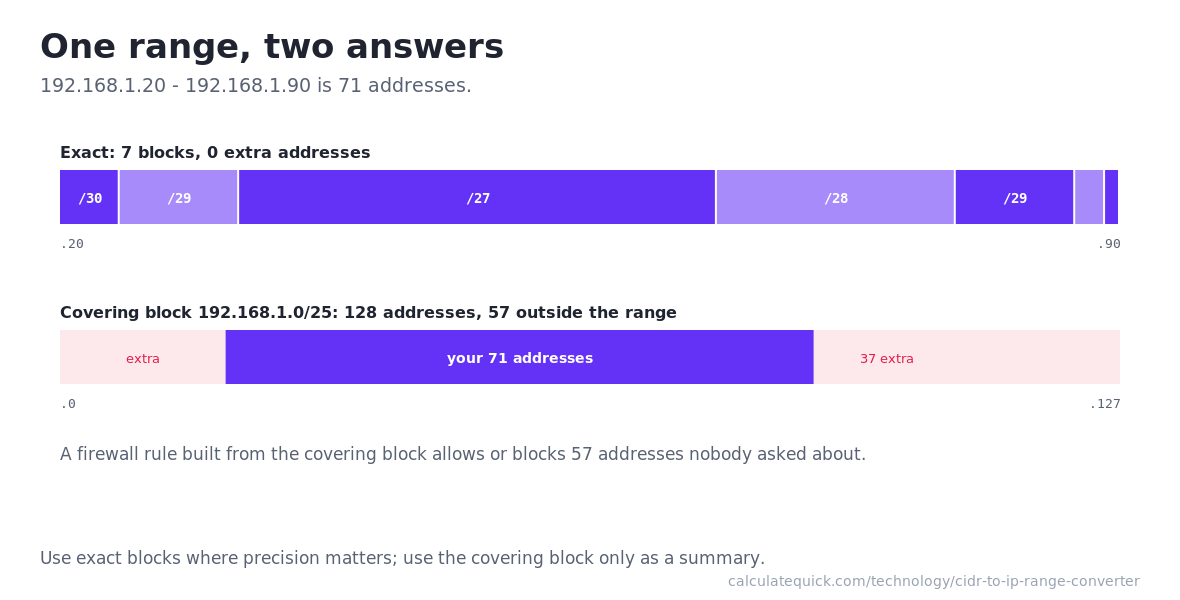
Which answer to use depends on the job. A covering block is fine for a quick mental model or a routing summary where extra space is harmless. It is dangerous in a firewall allow rule, a cloud security group, or a block list, because those 57 extra addresses get allowed or blocked too. The converter shows both, labels the covering block as broader, and counts its overshoot exactly.
Block Boundaries and Powers of Two
A CIDR block is not any stretch of addresses. Its size must be a power of two, and it must start on a boundary divisible by that size. A /30 holds 4 addresses and must start at a multiple of 4; a /26 holds 64 and must start at a multiple of 64. A range like 20 to 90 starts between boundaries and ends between boundaries, so no single block fits it exactly.
The conversion walks the range from the left. At each step it takes the biggest block that both starts cleanly at the current address and stays inside the remaining range, emits it, and jumps to the address after it. Starting at .20, only a 4-address block starts cleanly there, so /30 comes first. That lands on .24, where an 8-address block fits, then .32, where a full 64-address /27 fits, and so on down to the single leftover address at .90. The result is provably minimal. The same power-of-two arithmetic underpins binary multiplication.
Firewall Rules, WHOIS Ranges, and Block Lists
Firewall and ACL entries take CIDR, not ranges. When an abuse report or a log search hands you a start and end address, the exact block list pastes straight into iptables, pf, or a Cisco ACL without opening the door to neighbors of the offender. The same applies to cloud security groups and WAF rules, where every entry is a CIDR field.
WHOIS lookups often describe allocations as ranges. Converting them to CIDR turns “this provider owns 203.0.112.0 – 203.0.119.255” into rules or routing entries you can actually use. Published IP block lists work the same way; convert the ranges once, and if you mirror such lists for production use, verify the download against its published SHA-256 checksum before anything ingests it.
CIDR to Range covers the reverse direction: paste a block from a routing table, an allocation letter, or a WHOIS record and read off its exact boundaries and address count during handovers or provider negotiations.
Converting IPv6 Ranges
The math is identical in IPv6, just on 128 bits instead of 32. Blocks are still powers of two on aligned boundaries, ranges still decompose into a minimal list, and the Extra Addresses proof still applies. The converter handles full and compressed IPv6 notation in every mode, and address counts beyond the trillions display in power-of-two form so they stay readable. One family per conversion: a range must start and end in the same address family, and the converter says so plainly if the two boxes disagree.
Common Range Conversion Mistakes
Treating the end address as exclusive. Both ends are inclusive here and in nearly every networking context, so 192.168.1.20 – 192.168.1.90 is 71 addresses, not 70. Off-by-one errors from this assumption produce block lists that silently miss the last address.
Deploying the covering block where exactness matters. A deny rule built from a covering block punishes addresses that did nothing. Use the exact list and let the Extra Addresses count prove it is 0 before anything ships.
Entering a CIDR with host bits set and not noticing. 192.168.1.20/24 is not a valid block start; the real block is 192.168.1.0/24. The converter normalizes it and tells you it did, because a rule written against the un-normalized form may not match what a router computes.
Assuming a tidy range converts to one block. Ranges that start and end on power-of-two boundaries do; arbitrary ranges usually do not. Seven blocks for 71 addresses is a correct result.