------Binary View
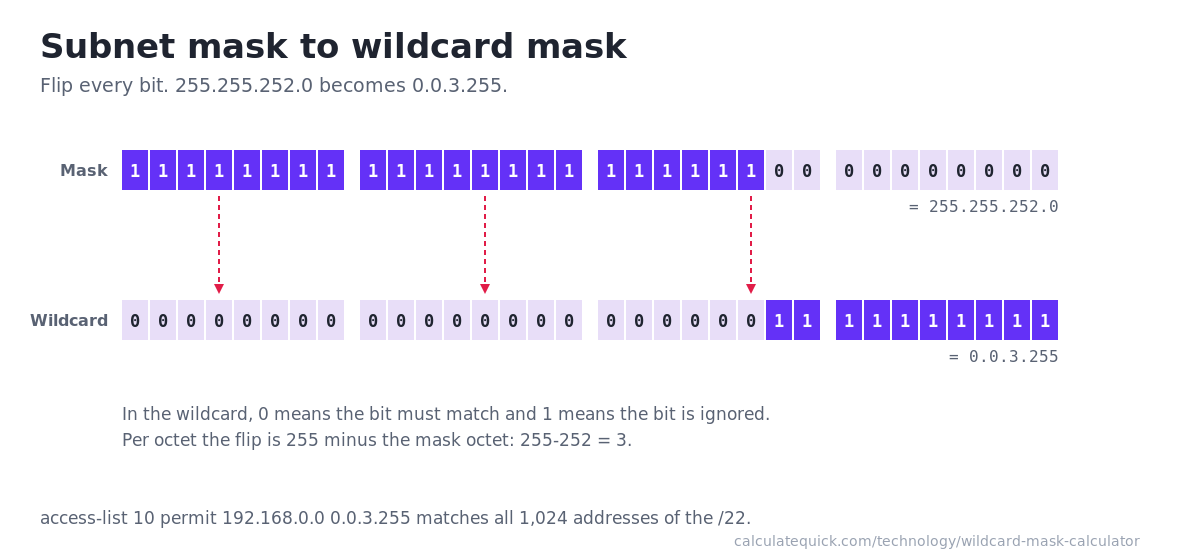
--In the wildcard, a 0 bit must match and a 1 bit is ignored. The wildcard is the subnet mask with every bit flipped.
Ready-to-Paste Lines
--Calculating a Wildcard Mask From Any Starting Point
Enter a network address, then whatever form of mask you have: a prefix like /24, a dotted subnet mask like 255.255.255.0, or a wildcard like 0.0.0.255. The calculator detects which one you typed and converts to the other two instantly, along with the match range, address count, binary view, and ready-to-paste access list and OSPF lines. Pasting a full CIDR block like 10.20.30.0/26 into the network box also works; it splits into both fields automatically.
A Wildcard Is the Mask Flipped
Every bit of the subnet mask inverted gives the wildcard, which is why 255.255.252.0 pairs with 0.0.3.255 and why the quick manual method is subtracting each mask octet from 255. The meaning inverts too: in a subnet mask, 1 bits mark the network portion, while in a wildcard, 0 bits mean the bit must match and 1 bits mean the bit is ignored. For the full anatomy of the underlying network, the IP subnet calculator breaks the same block into ranges, capacity, and special cases.
Where Wildcard Masks Are Used
Router access lists are the main place: an entry like permit 192.168.1.0 0.0.0.255 matches every address in that /24. OSPF network statements use the same syntax to decide which interfaces join a routing process, and EIGRP accepts them the same way. Two special values come up constantly: a wildcard of 0.0.0.0 matches exactly one address (routers usually write it as the keyword host), and 255.255.255.255 matches everything (the keyword any). When a rule needs to cover an arbitrary span of addresses rather than one clean block, convert the span with the IP range to CIDR converter first and write one entry per exact block.
| Prefix | Subnet Mask | Wildcard |
|---|---|---|
| /8 | 255.0.0.0 | 0.255.255.255 |
| /16 | 255.255.0.0 | 0.0.255.255 |
| /20 | 255.255.240.0 | 0.0.15.255 |
| /22 | 255.255.252.0 | 0.0.3.255 |
| /23 | 255.255.254.0 | 0.0.1.255 |
| /24 | 255.255.255.0 | 0.0.0.255 |
| /25 | 255.255.255.128 | 0.0.0.127 |
| /26 | 255.255.255.192 | 0.0.0.63 |
| /27 | 255.255.255.224 | 0.0.0.31 |
| /28 | 255.255.255.240 | 0.0.0.15 |
| /30 | 255.255.255.252 | 0.0.0.3 |
| /31 | 255.255.255.254 | 0.0.0.1 |
| /32 | 255.255.255.255 | 0.0.0.0 |
Non-Contiguous Wildcards
Unlike subnet masks, wildcards do not have to be contiguous. A wildcard of 0.0.254.255 has ignore bits scattered through the third octet, and access lists accept it: it matches every even-numbered /24 inside a /16 in one line. The calculator analyzes any non-contiguous wildcard you enter, counts exactly how many addresses it matches, and shows the pattern in binary. Two limitations apply: there is no CIDR or subnet mask equivalent for these patterns, and a colleague reading the config later may not decode the intent, so add a comment above the line in the config.
Common Wildcard Mistakes
Pasting the subnet mask where the wildcard belongs. An entry written with 255.255.255.0 instead of 0.0.0.255 inverts the match: it checks only the host bits and ignores the network, which inverts the intended match. Copying the generated line avoids the swap entirely.
Matching against an address with host bits set. The router pairs the wildcard with whatever base you give it, so permit 192.168.1.55 0.0.0.255 quietly behaves like 192.168.1.0. The calculator normalizes the base and tells you when it did.
Assuming the wildcard implies a subnet. A wildcard match is just a bit pattern test; it says nothing about how the network is actually subnetted. A rule matching a /22 span works even where four separate /24s are configured, which is sometimes exactly right and sometimes far too broad.