Subnet Division
Split the current network into equal-size smaller subnets. Results update as you type.
Address Bit Map
Click any bit to flip it, or drag the slider to resize the network.
Core Network Details
--------Capacity
Network Admin Shortcuts
----------Subnet Division Results
| # | Network | Mask | First Usable | Last Usable | Broadcast | Usable |
|---|
IPv6 Details
-----------Calculating a Subnet From Any Address and Prefix
Type an IPv4 address with a prefix, like 192.168.1.10/24, and every field updates as you type. There is no calculate button. If you have a dotted mask instead of a prefix, switch to Decimal Mask mode and enter the address and mask separately, or pick the mask from the quick-select list.
The bit map at the top of the results shows all 32 bits of the address. Purple bits are the network portion, light bits are the host portion. Click any bit to flip it and watch the address change, or drag the prefix slider to grow or shrink the network. Watching the network address snap to a new boundary as the slider moves is the fastest way to build an intuition for how prefixes work.
Three tools below the main results cover the common follow-up jobs. Subnet Division splits the network by subnet count, host count, or a target prefix. The membership check tells you whether a given address falls inside the current subnet and whether it lands on the network or broadcast address. Every value has a copy button, and the Cisco ACL Wildcard line can be pasted straight into an access list.
Subnet Cheat Sheet
Every prefix from /0 to /32 with its dotted mask, wildcard mask, and host capacity. The usable count is total addresses minus the network and broadcast addresses. The starred /31 and /32 rows follow their own rules, covered in the next section.
| CIDR | Mask | Wildcard | Total | Usable |
|---|---|---|---|---|
| /0 | 0.0.0.0 | 255.255.255.255 | 4,294,967,296 | 4,294,967,294 |
| /1 | 128.0.0.0 | 127.255.255.255 | 2,147,483,648 | 2,147,483,646 |
| /2 | 192.0.0.0 | 63.255.255.255 | 1,073,741,824 | 1,073,741,822 |
| /3 | 224.0.0.0 | 31.255.255.255 | 536,870,912 | 536,870,910 |
| /4 | 240.0.0.0 | 15.255.255.255 | 268,435,456 | 268,435,454 |
| /5 | 248.0.0.0 | 7.255.255.255 | 134,217,728 | 134,217,726 |
| /6 | 252.0.0.0 | 3.255.255.255 | 67,108,864 | 67,108,862 |
| /7 | 254.0.0.0 | 1.255.255.255 | 33,554,432 | 33,554,430 |
| /8 | 255.0.0.0 | 0.255.255.255 | 16,777,216 | 16,777,214 |
| /9 | 255.128.0.0 | 0.127.255.255 | 8,388,608 | 8,388,606 |
| /10 | 255.192.0.0 | 0.63.255.255 | 4,194,304 | 4,194,302 |
| /11 | 255.224.0.0 | 0.31.255.255 | 2,097,152 | 2,097,150 |
| /12 | 255.240.0.0 | 0.15.255.255 | 1,048,576 | 1,048,574 |
| /13 | 255.248.0.0 | 0.7.255.255 | 524,288 | 524,286 |
| /14 | 255.252.0.0 | 0.3.255.255 | 262,144 | 262,142 |
| /15 | 255.254.0.0 | 0.1.255.255 | 131,072 | 131,070 |
| /16 | 255.255.0.0 | 0.0.255.255 | 65,536 | 65,534 |
| /17 | 255.255.128.0 | 0.0.127.255 | 32,768 | 32,766 |
| /18 | 255.255.192.0 | 0.0.63.255 | 16,384 | 16,382 |
| /19 | 255.255.224.0 | 0.0.31.255 | 8,192 | 8,190 |
| /20 | 255.255.240.0 | 0.0.15.255 | 4,096 | 4,094 |
| /21 | 255.255.248.0 | 0.0.7.255 | 2,048 | 2,046 |
| /22 | 255.255.252.0 | 0.0.3.255 | 1,024 | 1,022 |
| /23 | 255.255.254.0 | 0.0.1.255 | 512 | 510 |
| /24 | 255.255.255.0 | 0.0.0.255 | 256 | 254 |
| /25 | 255.255.255.128 | 0.0.0.127 | 128 | 126 |
| /26 | 255.255.255.192 | 0.0.0.63 | 64 | 62 |
| /27 | 255.255.255.224 | 0.0.0.31 | 32 | 30 |
| /28 | 255.255.255.240 | 0.0.0.15 | 16 | 14 |
| /29 | 255.255.255.248 | 0.0.0.7 | 8 | 6 |
| /30 | 255.255.255.252 | 0.0.0.3 | 4 | 2 |
| /31 | 255.255.255.254 | 0.0.0.1 | 2 | 2* |
| /32 | 255.255.255.255 | 0.0.0.0 | 1 | 1* |
The /8, /16, and /24 rows are shaded because they fall on octet boundaries, where the mask is all 255s and 0s. Between those rows, the mask changes in one octet only. That octet is where the block increment lives, and the calculator reports it for whatever prefix you enter.
Point-to-Point Links and Host Routes
A /31 has two addresses and, on a point-to-point link, both are usable. RFC 3021 made this standard specifically to stop router-to-router links from burning a /30, which spends half its four addresses on network and broadcast. If your gear supports /31 on point-to-point interfaces, and virtually all modern routers do, there is no reason to keep allocating /30s for links.
A /32 is a single address, used for host routes and loopback interfaces on routers. It has no network or broadcast address, so a routing table entry like 10.0.0.1/32 means exactly one machine.
Cloud subnets play by different rules. AWS and Azure reserve the first four addresses and the last address of every subnet, so subtract five from the total rather than two. A /28 that shows 14 usable hosts in this calculator gives you 11 in a VPC. Oracle Cloud reserves three. Size cloud subnets a step larger than the raw numbers suggest.
Private and Special Address Ranges
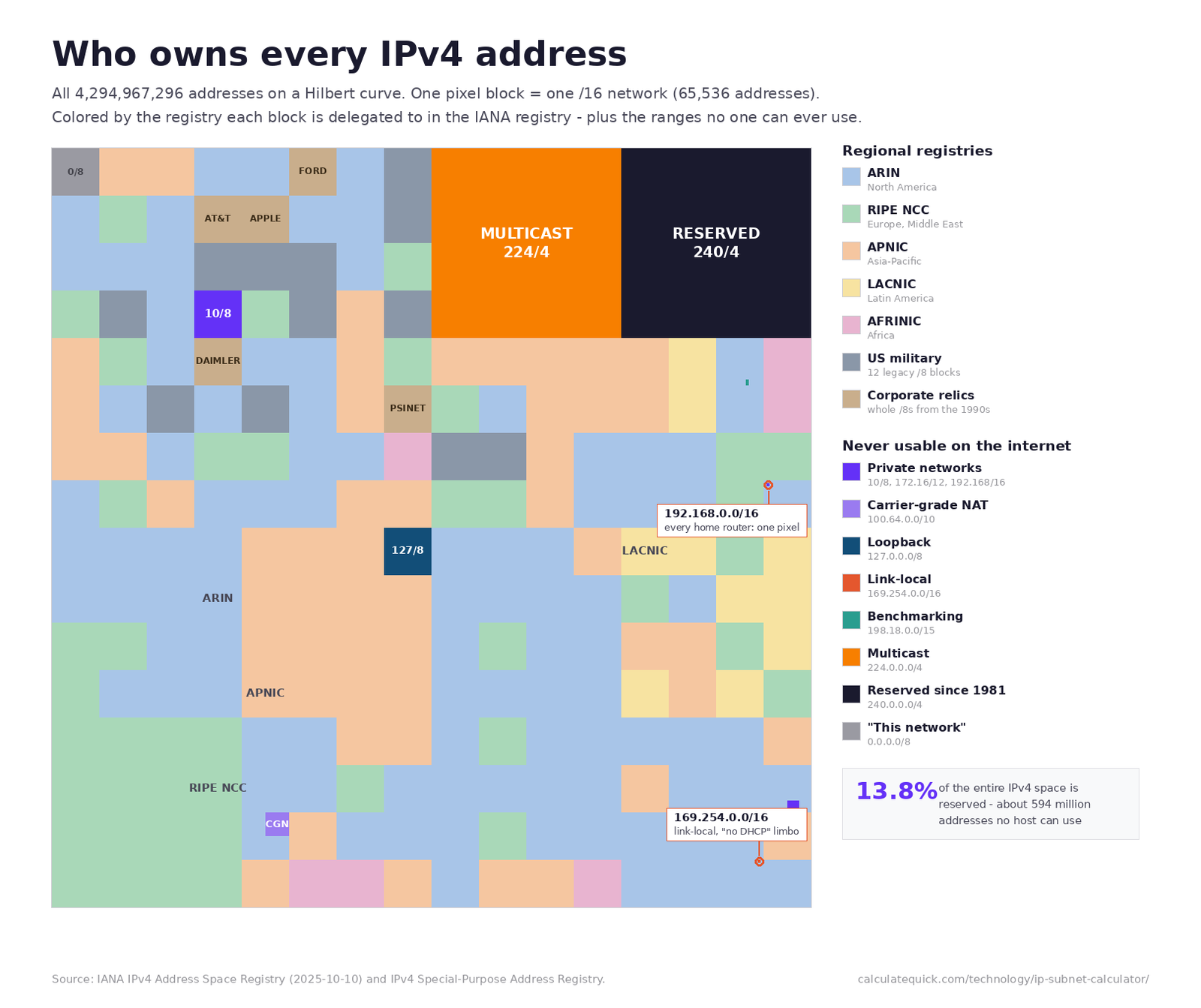
The calculator labels the scope of whatever address you enter. These are the ranges you will meet most often, from the IANA special-purpose registry.
| Block | Range | Purpose |
|---|---|---|
| 10.0.0.0/8 | 10.0.0.0 – 10.255.255.255 | Private (RFC 1918) |
| 172.16.0.0/12 | 172.16.0.0 – 172.31.255.255 | Private (RFC 1918) |
| 192.168.0.0/16 | 192.168.0.0 – 192.168.255.255 | Private (RFC 1918) |
| 100.64.0.0/10 | 100.64.0.0 – 100.127.255.255 | Carrier-grade NAT (RFC 6598) |
| 127.0.0.0/8 | 127.0.0.0 – 127.255.255.255 | Loopback |
| 169.254.0.0/16 | 169.254.0.0 – 169.254.255.255 | Link-local (APIPA) |
| 192.0.2.0/24 | TEST-NET-1 | Documentation only |
| 198.51.100.0/24 | TEST-NET-2 | Documentation only |
| 203.0.113.0/24 | TEST-NET-3 | Documentation only |
| 198.18.0.0/15 | 198.18.0.0 – 198.19.255.255 | Benchmarking (RFC 2544) |
| 224.0.0.0/4 | 224.0.0.0 – 239.255.255.255 | Multicast |
Two of these earn their keep daily. The 100.64.0.0/10 block means you are behind carrier-grade NAT, common on 4G and 5G connections, and port forwarding will not work there. The three TEST-NET blocks exist so documentation can show real-looking addresses without pointing at anyone’s actual network, which is why the examples on this page use them.
Splitting a Network Without Overlaps
Overlaps come from splitting a network in your head and getting a boundary wrong by one. The division table does the boundary math for you. Say you hold 10.20.0.0/16 and need four departments. Split by subnet count with 4, and you get 10.20.0.0/18, 10.20.64.0/18, 10.20.128.0/18, and 10.20.192.0/18. Each boundary is exactly the block increment apart, 64 in the second octet.
When departments need different sizes, allocate the largest first. A 500-host block needs a /23 (510 usable), a 200-host block needs a /24, and a pair of point-to-point links need /31s. Carving largest-first from the bottom of the range keeps every allocation on a clean boundary; going smallest-first fragments the space and forces awkward gaps later. After each carve, check the Next Subnet value to see where the following block must start, and drop any address into the membership check if you are unsure which subnet it belongs to. When a subnet approaches capacity, work out the utilization percentage before deciding whether to renumber, since anything above roughly 80 percent of usable addresses leaves too little headroom for DHCP churn.
Address planning is only half of a build-out. If the new subnets mean new switch closets, the physical side has its own math, from the weight of the copper cable runs between floors to standby battery capacity for the alarm panels sharing the comms room.
Reading the Binary
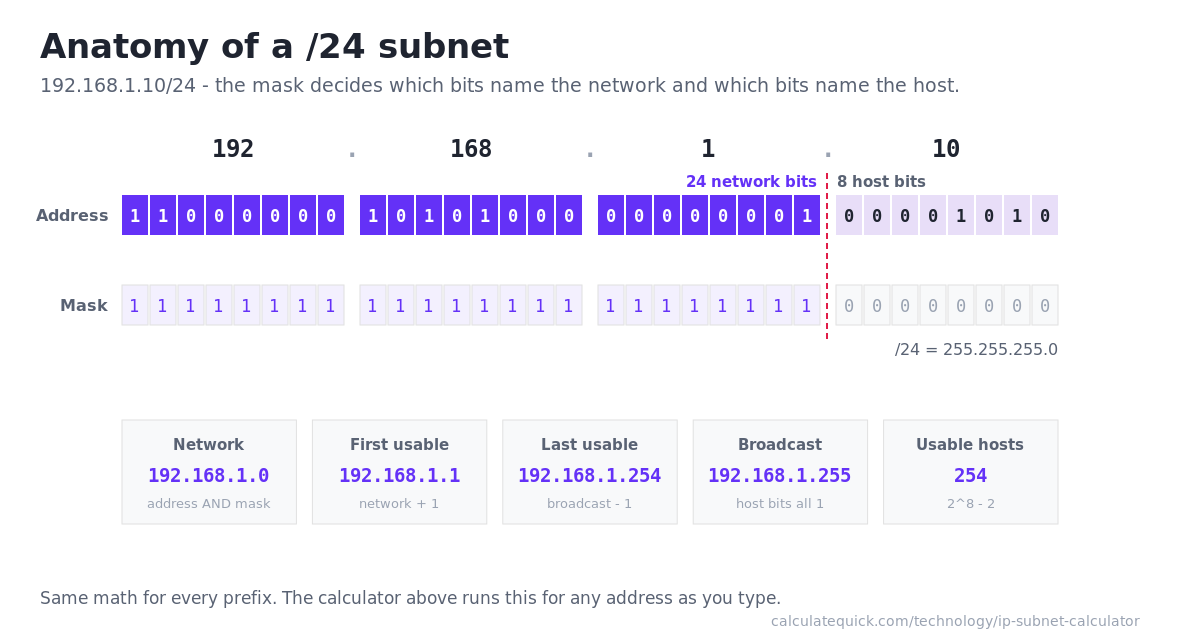
Every result on this page comes from one operation. Write the address and the mask in binary, AND them together bit by bit, and the result is the network address. Take 172.16.4.22/20. The third octet of the address is 4, or 00000100 in binary. A /20 mask covers the first four bits of that octet (11110000, which is 240), so the AND keeps the top four bits and zeroes the rest, leaving 0. Network address 172.16.0.0, broadcast 172.16.15.255, because the 12 host bits all set to 1 add 15 to the third octet and 255 to the fourth.
The wildcard mask is simply the mask with every bit flipped, which is why 255.255.240.0 pairs with 0.0.15.255. Cisco ACLs match on wildcard bits, so pasting the mask where the wildcard belongs matches almost nothing, a mistake covered below. If bitwise arithmetic interests you beyond networking, the same logic drives how computers multiply binary numbers.
IPv6 Prefixes in Practice
IPv6 subnetting is simpler than IPv4 in one big way. Every LAN gets a /64, full stop. SLAAC address autoconfiguration requires 64 host bits, so resist the urge to conserve addresses with longer prefixes on normal segments. Conservation thinking belongs at the site level, where a /48 gives you 65,536 /64 networks and a /56 gives you 256. The calculator’s /64 Subnets Inside figure shows exactly how many LANs fit in whatever allocation your provider handed you.
There is no broadcast address in IPv6 (RFC 4291 replaced broadcast with multicast), so the last address in a prefix is just another usable address. When you write IPv6 addresses down, RFC 5952 wants lowercase hex, leading zeros dropped, and the longest zero run compressed with a double colon, which is the Compressed form the calculator outputs. One practical planning note, keep prefix lengths divisible by 4 where you can. Nibble-aligned prefixes map cleanly onto reverse DNS zones, and the calculator prints the exact zone name for any aligned prefix.
Common Subnetting Mistakes
Assigning the network or broadcast address to a host. The first and last addresses of any subnet below /31 are not usable, and a device configured with one will fail in confusing, intermittent ways.
Putting the gateway outside the subnet. A host at 192.168.1.50/26 cannot reach a gateway at 192.168.1.1, because /26 puts them in different subnets, 192.168.1.0 – 192.168.1.63 versus its neighbors. The membership check catches this in seconds.
Using the subnet mask where the wildcard belongs. An ACL written with 255.255.255.0 instead of 0.0.0.255 inverts the match. Copy the Cisco ACL Wildcard line from the results instead of converting by hand.
Trusting IPv4 host counts in the cloud. The five reserved addresses per subnet in AWS and Azure turn a “big enough” /28 into a too-small one. Plan against the provider’s usable count, not the classic one.
Defaulting everything to /24. It is the comfortable prefix, but a point-to-point link on a /24 wastes 252 addresses, and a 400-host floor forced into a /24 cannot grow. Right-size from the cheat sheet instead, and while you are changing habits, verify firmware images with a SHA-256 checksum before flashing the router you are about to renumber.