| Subnet | Hosts Needed | Network | Mask | Usable Range | Broadcast | Usable | Spare |
|---|
Calculating a VLSM Plan From Host Counts
Enter the network you have been given, then list each subnet with a name and the number of hosts it must support. The plan recalculates as you type: every subnet gets the smallest block that fits its host count, allocated largest-first from the bottom of your network. The table shows each subnet’s network address, mask, usable range, and broadcast, and the bar above it shows how the whole block is carved up, including what is still free.
If the plan does not fit, the calculator says which subnet broke it, so you can shrink a host count, drop a subnet, or ask for a bigger block. Copy CSV exports the whole table for documentation, and Share Link produces a URL that reopens your exact plan, which makes it easy to send a proposed addressing scheme to a colleague.
Allocation Order and Alignment
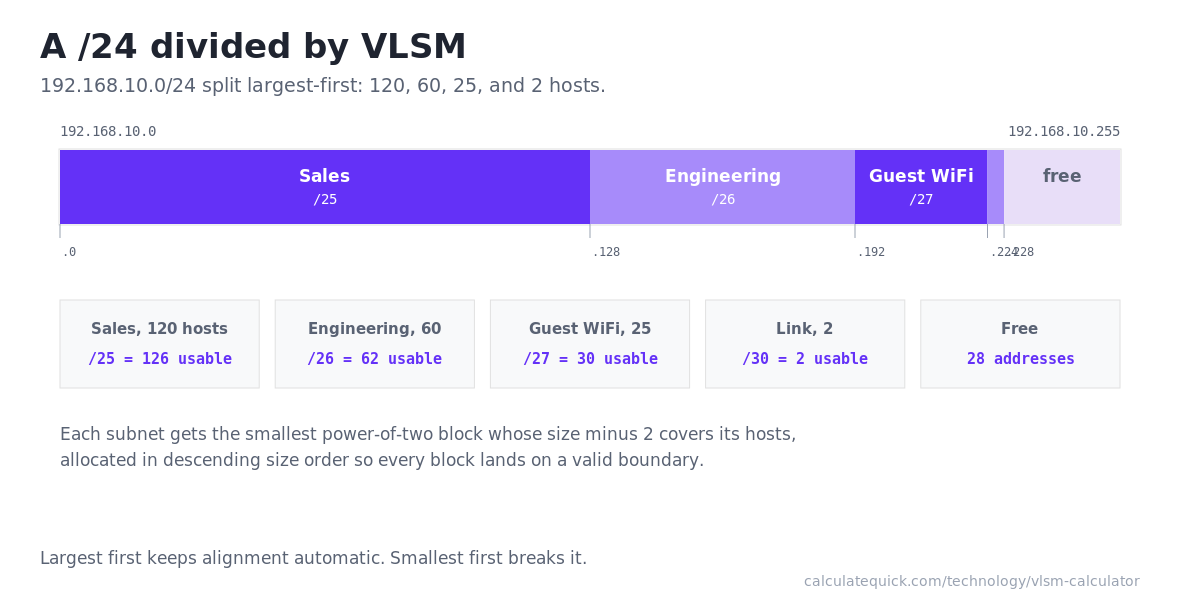
Every subnet must start on a boundary divisible by its own size. Allocating the biggest subnets first keeps every allocation on a valid boundary: after a /25 placed at the bottom of a /24, the next address is a clean /26 boundary, then a /27 boundary, and so on. Allocated smallest-first, the large subnets need boundaries the earlier allocations already broke, which forces gaps and wastes space. The calculator sorts for you, then presents the results back in the order you listed them.
The sizing rule is the classic one used in networking courses and exams: a subnet needs the smallest power of two where the block size minus two covers the requested hosts, since the network and broadcast addresses are unusable. A request for 120 hosts gets a /25 (126 usable), 60 hosts gets a /26 (62 usable), and 2 hosts gets a /30. To see any allocated block down at the bit level, drop it into the IP subnet calculator.
The block size steps are fixed, so every host count maps to exactly one prefix:
| Hosts Needed | Prefix | Usable | Block Size |
|---|---|---|---|
| 1 – 2 | /30 | 2 | 4 |
| 3 – 6 | /29 | 6 | 8 |
| 7 – 14 | /28 | 14 | 16 |
| 15 – 30 | /27 | 30 | 32 |
| 31 – 62 | /26 | 62 | 64 |
| 63 – 126 | /25 | 126 | 128 |
| 127 – 254 | /24 | 254 | 256 |
| 255 – 510 | /23 | 510 | 512 |
| 511 – 1022 | /22 | 1022 | 1,024 |
| 1023 – 2046 | /21 | 2046 | 2,048 |
| 2047 – 4094 | /20 | 4094 | 4,096 |
Reading the Spare Column
Spare is usable addresses minus requested hosts. Because blocks only come in power-of-two sizes, a 130-host request jumps from a /25 (126 usable, too small) to a /24 (254 usable), leaving 124 spare. That spare is growth headroom. If a department asks for 130 and will not grow, reducing the request to 126 saves half a /24. A spare of 1 or 2 is the opposite warning: any new device in that subnet forces a renumber.
Leftover Free Blocks
Whatever the plan does not use is listed as exact CIDR blocks, ready to allocate later. Record them in the documentation with the plan itself. Unrecorded free space is a common cause of overlapping subnets later. The free list uses the same exact-block math as the CIDR to IP range converter, so each chip is a real allocatable block, not an approximation.
Point-to-Point Links in a Plan
A router-to-router link needs exactly 2 usable addresses, which this calculator sizes as a /30, matching textbook and exam expectations. On modern equipment a /31 also works for point-to-point links and wastes nothing, so production networks often use /31s instead. If you plan with /31s, size the link rows as 2 hosts here, then halve those blocks when you configure.
Common VLSM Mistakes
Forgetting the two reserved addresses. A subnet for 30 hosts does not fit in a /27 minus nothing; a /27 holds exactly 30 usable of 32 addresses. A request for 31 needs a /26. The table above lists every jump point.
Allocating in listed order instead of size order. That works only when the list happens to be sorted already. When a small subnet lands first, alignment breaks and manually calculated plans start overlapping.
Counting interfaces instead of addresses. Every device interface, gateway, printer, access point, and management address in the subnet consumes one. Gateways are the most common omission: a 62-host request that did not count its gateway needs 63 addresses and no longer fits a /26.